Who it is for
- Best for: Business, operations and support roles
- Industry: Any industry
- Level: Any level
Starting out? The graduate template puts education and projects first.
Section by section
What the file asks you to write in each section, in order.
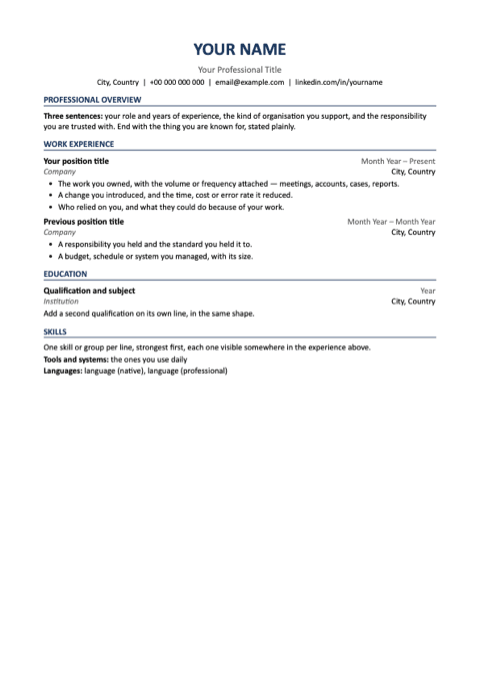
- Professional overviewThree sentences: your role and years of experience, the kind of organisation you support, and the responsibility you are trusted with. End with the thing you are known for, stated plainly.
- Work experienceThe work you owned, with the volume or frequency attached — meetings, accounts, cases, reports.A change you introduced, and the time, cost or error rate it reduced.Who relied on you, and what they could do because of your work.A responsibility you held and the standard you held it to.A budget, schedule or system you managed, with its size.
- EducationAdd a second qualification on its own line, in the same shape.
- SkillsOne skill or group per line, strongest first, each one visible somewhere in the experience above.Tools and systems: the ones you use dailyLanguages: language (native), language (professional)
Writing a professional CV
What to put in, and what to leave out.
Do
- Say what you were accountable for, not what the team did around you.
- Give the scale you worked at: people, budget, volume or accounts.
- Keep the overview to three sentences a reader can repeat back.
Avoid
- Don't lay skills out in columns — one per line survives parsing.
- Don't open with an adjective; open with the role and the years.
- Don't list duties that any holder of the job would have.
Check it for a role or company
Fill in the template, then see how it matches.
Other templates
Questions
What does the professional template include?
4 sections, in this order: Professional overview, Work experience, Education, Skills. Each one has a placeholder saying what to write there. Best for: Business, operations and support roles.
Is the professional template free?
Yes. It is a Word file you download directly, with no email address and no account. Edit it in Word, Google Docs or LibreOffice.
Can I use it as a US resume?
The file is A4, the size UK, EU and Indian employers expect. For a US resume, switch the page to Letter in Word under Layout, then Size. Nothing else needs to change.
Will hiring software read it?
It was checked with the same text extraction Resymetry runs on an uploaded CV, last on 8 November 2026. That covers the layout. Whether your CV matches a job depends on what you write in it, which is what the free score checks.
Filled in the template?
Check it against the job you want. Free score, no account, no card.