Free ATS CV Templates (Word, No Sign-up)
CV templates that hiring software can read as plain text. Pick one, download the Word file, and fill it in. No email, no account.
Word .docx · A4 · One column, standard headings
Download a free ATS CV template
14 of 14 templates
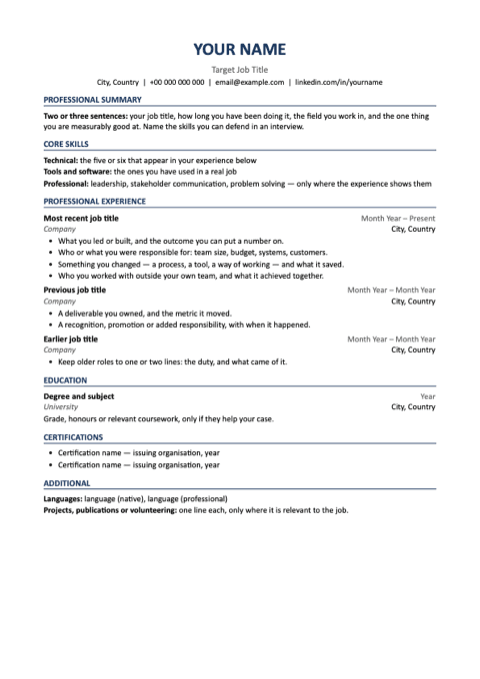
Reverse chronological
Word .docx · A4 · 8 KB
Any industry · Any level
The format most employers expect: newest job first, dates against the right margin, and a placeholder on every line telling you what belongs there. Skills are grouped into technical, tools and professional, with room for certifications and languages.
Professional summary · Core skills · Professional experience · Education · Certifications · Additional
What to write, what to avoid
Do
- Lead each bullet with what you did, then the result you can evidence.
- Keep one date format down the whole page.
- Put the most recent role first and give it the most space.
Avoid
- Don't leave a gap unexplained — a one-line note costs you less than the question.
- Don't pad older roles; two lines is enough once the work is three years old.
- Don't use a skills list to claim what the experience does not show.
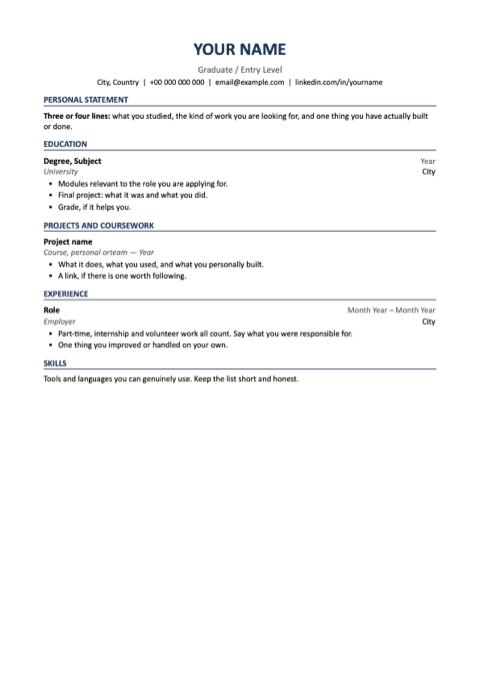
Graduate / Entry Level
Word .docx · A4 · 8 KB
Any industry · Entry level
A graduate / entry level layout with the sections a reviewer expects for this role, and a placeholder on every line telling you what belongs there. One column, no tables, standard headings.
Personal statement · Education · Projects and coursework · Experience · Skills
What to write, what to avoid
Do
- Put education first and give it real detail.
- Describe what you personally built in a project, and link it.
- Count part-time and volunteer work — say what you ran.
Avoid
- Don't present a tutorial you followed as your own project.
- Don't pad with soft skills you cannot show.
- Don't apologise for lack of experience anywhere on the page.
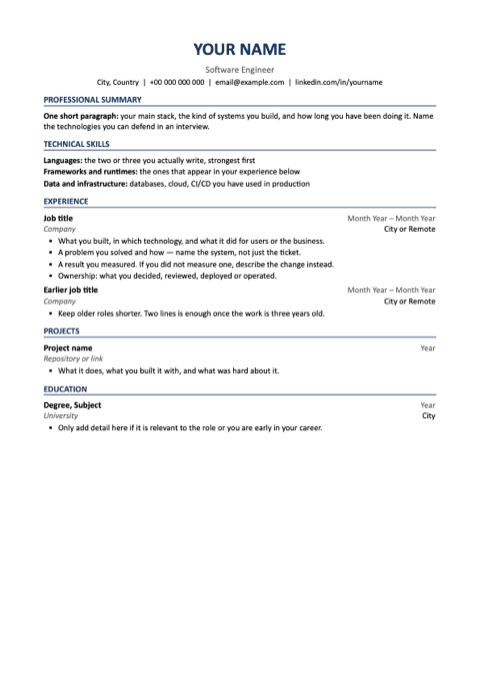
Software Engineer
Word .docx · A4 · 8 KB
Technology · Any level
A software engineer layout with the sections a reviewer expects for this role, and a placeholder on every line telling you what belongs there. One column, no tables, standard headings.
Professional summary · Technical skills · Experience · Projects · Education
What to write, what to avoid
Do
- Name the system, the language and what it did for users.
- Put the stack inside your experience, not only in a skills list.
- Show one feature you carried from interface to data.
Avoid
- Don't list every framework you have touched — each one invites a question.
- Don't write "responsible for" where you can write what you built.
- Don't claim architecture when the work was implementation.
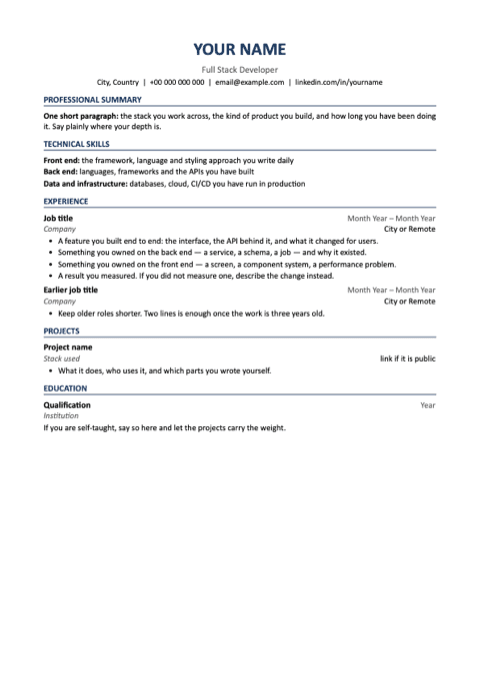
Full Stack Developer
Word .docx · A4 · 8 KB
Technology · Any level
A full stack developer layout with the sections a reviewer expects for this role, and a placeholder on every line telling you what belongs there. One column, no tables, standard headings.
Professional summary · Technical skills · Experience · Projects · Education
What to write, what to avoid
Do
- Name both halves of the stack on the same feature, so the claim is provable.
- Say which end you owned when the team was larger than you.
- Include one thing you shipped end to end: interface, API and schema.
Avoid
- Don't call yourself full stack on the strength of one tutorial back end.
- Don't separate front and back end into two skill lists with no project joining them.
- Don't hide which side is weaker — a reviewer finds out in the interview anyway.
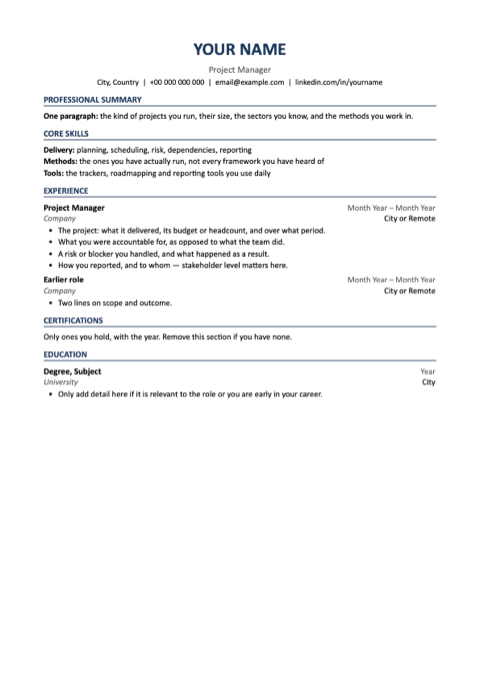
Project Manager
Word .docx · A4 · 8 KB
Delivery & operations · Mid to senior
A project manager layout with the sections a reviewer expects for this role, and a placeholder on every line telling you what belongs there. One column, no tables, standard headings.
Professional summary · Core skills · Experience · Certifications · Education
What to write, what to avoid
Do
- State budget, headcount and duration for each project.
- Separate what you were accountable for from what the team delivered.
- Name the stakeholder level you reported to.
Avoid
- Don't list a methodology you have only read about.
- Don't describe the project without saying what you decided.
- Don't hide the size — scope is the first thing a reader looks for.
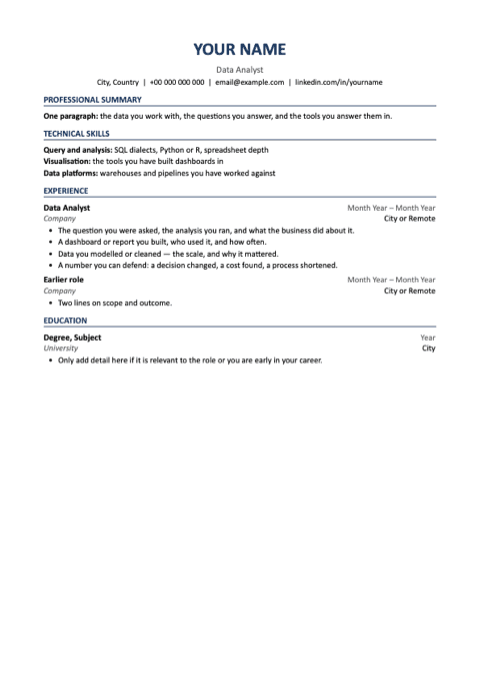
Data Analyst
Word .docx · A4 · 8 KB
Data · Any level
A data analyst layout with the sections a reviewer expects for this role, and a placeholder on every line telling you what belongs there. One column, no tables, standard headings.
Professional summary · Technical skills · Experience · Education
What to write, what to avoid
Do
- Say what question you were asked and what changed because of your answer.
- Name the database and the dialect, not just "SQL".
- Say who used your dashboard, and how often.
Avoid
- Don't list every chart type and tool as a skill.
- Don't give a number you cannot explain the method behind.
- Don't describe the analysis without the decision it supported.
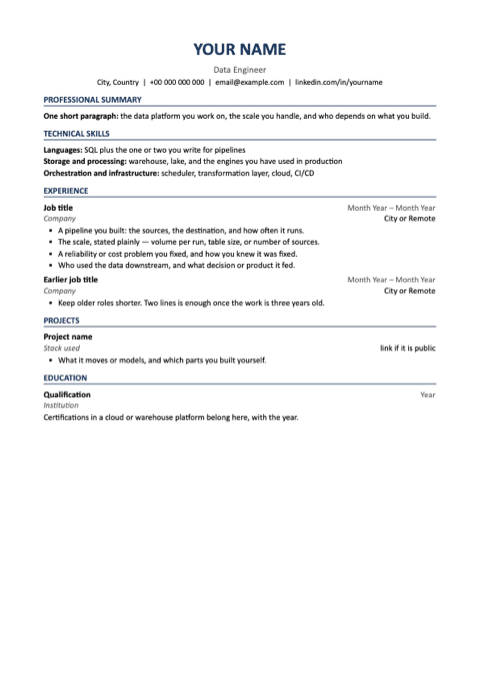
Data Engineer
Word .docx · A4 · 8 KB
Data · Mid to senior
A data engineer layout with the sections a reviewer expects for this role, and a placeholder on every line telling you what belongs there. One column, no tables, standard headings.
Professional summary · Technical skills · Experience · Projects · Education
What to write, what to avoid
Do
- State the scale you worked at: rows, volume, or how often the pipeline runs.
- Name the warehouse, the orchestrator and the transformation layer by name.
- Say who consumed the data and what they did with it.
Avoid
- Don't list every tool in the ecosystem — name the ones you have run in production.
- Don't describe a pipeline without saying what broke and how you made it reliable.
- Don't present analyst work as engineering, or the interview will find the gap.
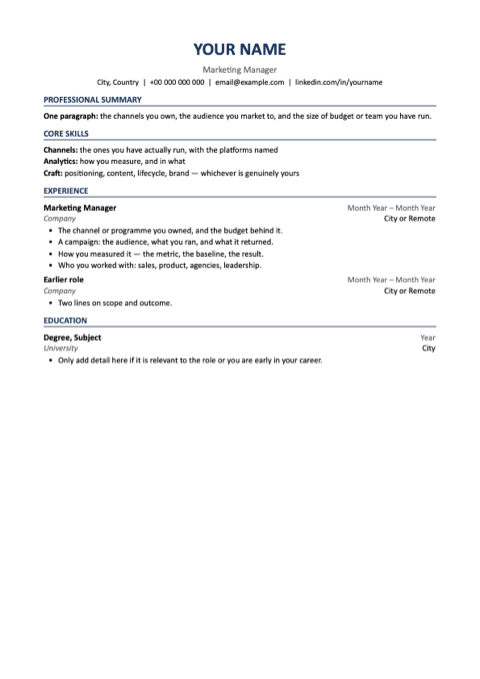
Marketing Manager
Word .docx · A4 · 8 KB
Marketing · Mid to senior
A marketing manager layout with the sections a reviewer expects for this role, and a placeholder on every line telling you what belongs there. One column, no tables, standard headings.
Professional summary · Core skills · Experience · Education
What to write, what to avoid
Do
- Give the budget and the channel you owned outright.
- Pair each campaign with the metric you judged it on.
- Name the platforms, not just "digital marketing".
Avoid
- Don't claim a result the whole team produced.
- Don't use impressions where you could use pipeline or revenue.
- Don't fill the page with adjectives about being creative.
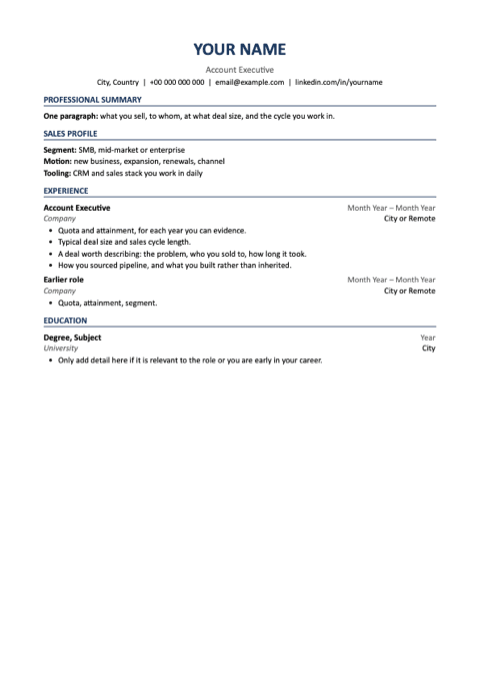
Account Executive
Word .docx · A4 · 8 KB
Sales · Any level
An account executive layout with the sections a reviewer expects for this role, and a placeholder on every line telling you what belongs there. One column, no tables, standard headings.
Professional summary · Sales profile · Experience · Education
What to write, what to avoid
Do
- Give quota and attainment for each year you can evidence.
- State deal size and cycle length — they define the role you are applying for.
- Say how much pipeline you sourced yourself.
Avoid
- Don't give attainment without the quota behind it.
- Don't claim a team's number as your own.
- Don't leave out the segment; enterprise and SMB are different jobs.
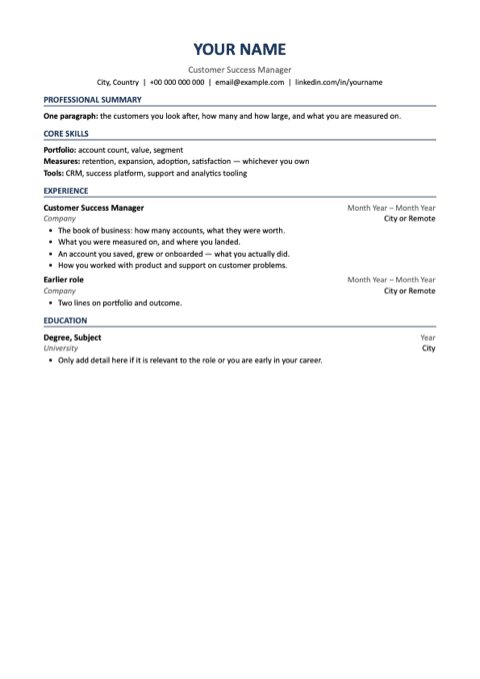
Customer Success Manager
Word .docx · A4 · 8 KB
Customer · Any level
A customer success manager layout with the sections a reviewer expects for this role, and a placeholder on every line telling you what belongs there. One column, no tables, standard headings.
Professional summary · Core skills · Experience · Education
What to write, what to avoid
Do
- Give the book: account count and value.
- State what you were measured on, and where you landed.
- Describe one account you saved or grew, and what you did.
Avoid
- Don't describe the role as support if it was commercial.
- Don't give a retention figure without the period.
- Don't list the tools and call it a skills section.
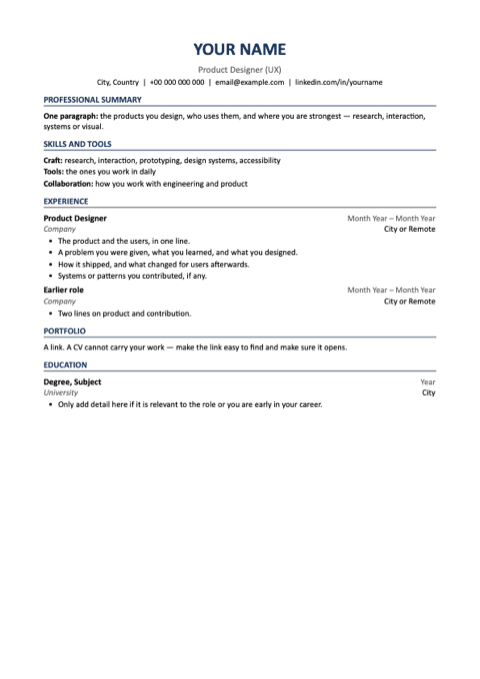
Product Designer (UX)
Word .docx · A4 · 8 KB
Design · Any level
A product designer (ux) layout with the sections a reviewer expects for this role, and a placeholder on every line telling you what belongs there. One column, no tables, standard headings.
Professional summary · Skills and tools · Experience · Portfolio · Education
What to write, what to avoid
Do
- Lead with the problem and the users, not the tool.
- Say what shipped, and what changed for users after it did.
- Make the portfolio link obvious, and check it opens.
Avoid
- Don't make the CV carry the work — that is what the portfolio is for.
- Don't list every tool; it says nothing about judgement.
- Don't describe a redesign without saying why it was needed.
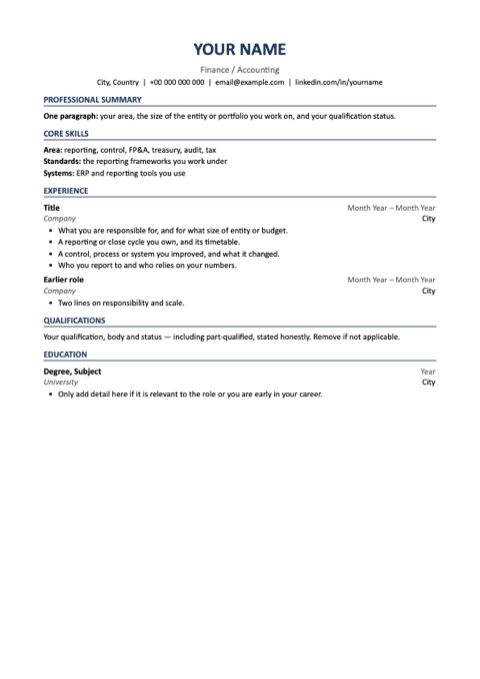
Finance / Accounting
Word .docx · A4 · 8 KB
Finance · Any level
A finance / accounting layout with the sections a reviewer expects for this role, and a placeholder on every line telling you what belongs there. One column, no tables, standard headings.
Professional summary · Core skills · Experience · Qualifications · Education
What to write, what to avoid
Do
- Give the size of the entity, portfolio or budget you work on.
- State your qualification status plainly, including part-qualified.
- Name the reporting framework and the systems you work in.
Avoid
- Don't be vague about scale — it is how seniority is read here.
- Don't list every spreadsheet function as a skill.
- Don't overstate ownership of a close you contributed to.
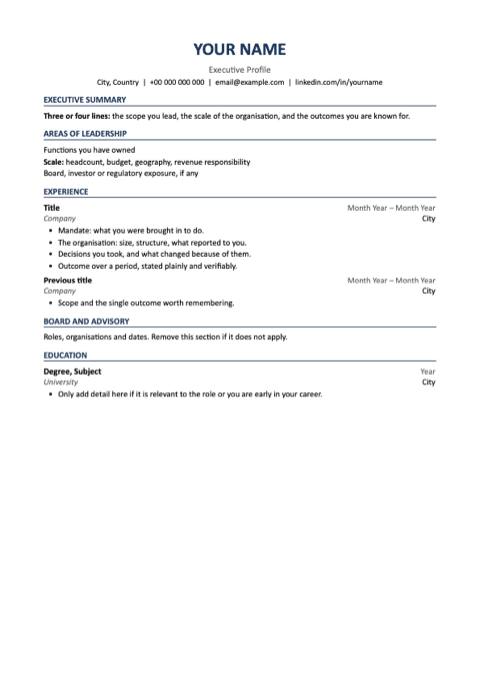
Executive Profile
Word .docx · A4 · 8 KB
Leadership · Executive
An executive profile layout with the sections a reviewer expects for this role, and a placeholder on every line telling you what belongs there. One column, no tables, standard headings.
Executive summary · Areas of leadership · Experience · Board and advisory · Education
What to write, what to avoid
Do
- Lead with mandate and scope, then the outcome.
- Give headcount, budget and geography in the first lines of each role.
- Say what you decided, not what the organisation achieved around you.
Avoid
- Don't run past two pages at this level without a reason.
- Don't list operational tasks — they read as a smaller job.
- Don't imply board exposure you did not have.
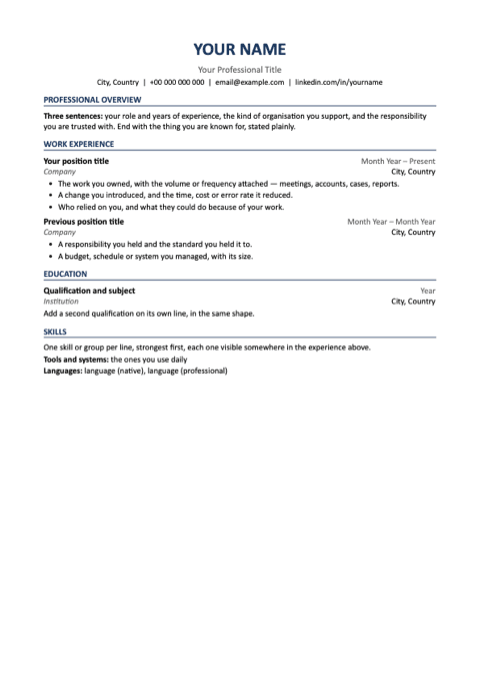
Professional
Word .docx · A4 · 8 KB
Any industry · Any level
A shorter page for business and support roles: an overview, then experience, education and skills. Same layout as the reverse chronological template with fewer sections, so there is less to fill in when your history is straightforward.
Professional overview · Work experience · Education · Skills
What to write, what to avoid
Do
- Say what you were accountable for, not what the team did around you.
- Give the scale you worked at: people, budget, volume or accounts.
- Keep the overview to three sentences a reader can repeat back.
Avoid
- Don't lay skills out in columns — one per line survives parsing.
- Don't open with an adjective; open with the role and the years.
- Don't list duties that any holder of the job would have.
Each file is read with the same text extraction Resymetry runs on an uploaded CV before it is listed. Last checked . Comparing other free template sources? Our comparison of free CV templates.
Why these parse cleanly
Most applicant tracking systems read a CV as plain text before a person sees it. These are the layout rules that keep that text intact.
- One column, top to bottom. Multi-column layouts can be read in the wrong order, mixing two jobs into one line.
- Contact details in the body, never in the Word header or footer, which many systems skip entirely.
- Standard section names — Summary, Work Experience, Education, Skills — so sections are recognised without guessing.
- Real text instead of text boxes, tables, images or icons, which often come out empty.
- One date format for every role, so your timeline can be read consistently.
- Selectable text, not a scan or an exported picture of a page.
ATS resume templates: the same files
A US employer calls this document a resume. The layout rules are the same.
These templates work as a resume too. They are A4; for a US or Canadian application, switch the page to US Letter in Word under Layout, then Size. Nothing else needs to change.
Questions about ATS CV templates
What is an ATS CV template?
A CV layout that hiring software (an applicant tracking system, or ATS) can read as plain text: one column, standard section names, real text instead of tables or text boxes, and contact details in the body rather than the Word header.
Is Word or PDF better for an ATS?
Both work when the text is real and selectable. Send the format the application asks for. If it names none, a .docx or a PDF saved from Word is fine; a scan or an exported picture of a page is not.
Are Canva or two-column CVs ATS-friendly?
Often not. Text inside images comes out empty, and two columns can be read in the wrong order, mixing two jobs into one line. If you use a design template, export a PDF with selectable text and check it reads top to bottom.
Is a CV the same as a resume?
For most jobs, yes. In the US and Canada the one- or two-page document is called a resume; in the UK, Europe and India it is called a CV. These templates work as either.
What paper size are these templates?
A4, the usual size for a CV in the UK, Europe and India. For a US employer, switch to US Letter in Word under Layout, then Size.
Are these templates really free?
Yes. Each one is a direct Word download with no email, account or watermark. Resymetry earns money only from an optional full CV report, $2.99 once.
A template alone will not get you shortlisted
Layout is the part software reads; content is the part people judge.
A clean template makes sure your experience is read. What decides the screen is whether that experience matches the job: the skills you evidence, the results you can show, and the requirements you meet. Check your CV against the job to see which of those are missing. The score is free; the full analysis is $2.99 one-time, no subscription.
See how your CV reads for the job you want
Your score and your biggest problems are free. The full report is a one-time $2.99.