Who it is for
- Best for: Any role with a steady work history
- Industry: Any industry
- Level: Any level
Starting out? The graduate template puts education and projects first.
Section by section
What the file asks you to write in each section, in order.
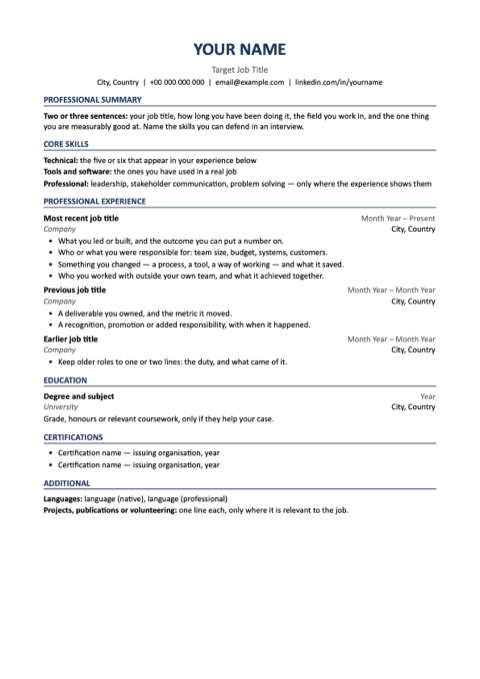
- Professional summaryTwo or three sentences: your job title, how long you have been doing it, the field you work in, and the one thing you are measurably good at. Name the skills you can defend in an interview.
- Core skillsTechnical: the five or six that appear in your experience belowTools and software: the ones you have used in a real jobProfessional: leadership, stakeholder communication, problem solving — only where the experience shows them
- Professional experienceWhat you led or built, and the outcome you can put a number on.Who or what you were responsible for: team size, budget, systems, customers.Something you changed — a process, a tool, a way of working — and what it saved.Who you worked with outside your own team, and what it achieved together.A deliverable you owned, and the metric it moved.A recognition, promotion or added responsibility, with when it happened.Keep older roles to one or two lines: the duty, and what came of it.
- EducationGrade, honours or relevant coursework, only if they help your case.
- CertificationsCertification name — issuing organisation, yearCertification name — issuing organisation, year
- AdditionalLanguages: language (native), language (professional)Projects, publications or volunteering: one line each, only where it is relevant to the job.
Writing a reverse chronological CV
What to put in, and what to leave out.
Do
- Lead each bullet with what you did, then the result you can evidence.
- Keep one date format down the whole page.
- Put the most recent role first and give it the most space.
Avoid
- Don't leave a gap unexplained — a one-line note costs you less than the question.
- Don't pad older roles; two lines is enough once the work is three years old.
- Don't use a skills list to claim what the experience does not show.
Check it for a role or company
Fill in the template, then see how it matches.
Other templates
Questions
What does the reverse chronological template include?
6 sections, in this order: Professional summary, Core skills, Professional experience, Education, Certifications, Additional. Each one has a placeholder saying what to write there. Best for: Any role with a steady work history.
Is the reverse chronological template free?
Yes. It is a Word file you download directly, with no email address and no account. Edit it in Word, Google Docs or LibreOffice.
Can I use it as a US resume?
The file is A4, the size UK, EU and Indian employers expect. For a US resume, switch the page to Letter in Word under Layout, then Size. Nothing else needs to change.
Will hiring software read it?
It was checked with the same text extraction Resymetry runs on an uploaded CV, last on 8 November 2026. That covers the layout. Whether your CV matches a job depends on what you write in it, which is what the free score checks.
Filled in the template?
Check it against the job you want. Free score, no account, no card.